How to Move a Website to a New Domain Without Losing Rankings
There are many reasons to change a domain: rebranding, a shorter or more memorable name, a different domain zone, or simply an expired domain that could not be renewed. Copying the files takes minutes, but for search engines a new domain is a new website nobody knows yet.

If you move without preparation, pages on the old domain will drop out of search results, and the new ones will be indexed from scratch. This plan will help you keep your rankings and your visitors.
Preparation
Before the move, record the current state of the website. Save the list of all pages (the easiest way is to take it from sitemap.xml) and export statistics from Yandex Webmaster and Google Search Console: which pages are indexed, which queries bring visitors and where the website ranks. You will need this data to compare the results after the move.
Prepare the new domain in advance: set up DNS, hosting and an SSL certificate. Most hosting providers offer a free Let's Encrypt certificate that you can usually issue right in the control panel.
⚠️ Important: never switch off the old domain — renew it for at least a year, because search engines and users will reach the new website through it.
Moving the website
First, copy the website to the new domain, then find and replace every mention of the old address. Most often they are found in CMS settings (for example, the site address in WordPress settings), in the database (absolute links in posts and products), in templates, robots.txt and sitemap.xml. The canonical tag and Open Graph meta tags must point to the new domain as well.
Make sure that indexing is not blocked on the new domain. If the website was first built on a test address, robots.txt may still contain Disallow: /, and the template may still have a noindex meta tag. In that case search engines simply won't see the new website.
301 redirect
The key step of the move is a permanent 301 redirect from the old domain to the new one. It tells search engines that the website has moved for good and passes the accumulated link equity to the new domain. The redirect must work page by page: every page of the old domain should lead to the same page on the new one, not to the home page. In Apache, this can be done in the .htaccess file on the old domain:
RewriteEngine On
RewriteCond %{HTTP_HOST} ^(www\.)?old-domain\.ru$ [NC]
RewriteRule ^ https://new-domain.ru%{REQUEST_URI} [R=301,L]
In Nginx — in the server configuration:
server {
    listen 80;
    listen 443 ssl;
    server_name old-domain.ru www.old-domain.ru;

    return 301 https://new-domain.ru$request_uri;
}
The old domain must also open over HTTPS with a valid certificate, otherwise the browser will show an error before the redirect even happens. Avoid redirect chains as well: it's better to redirect straight to the final address like https://new-domain.ru/page rather than through intermediate http or www versions.
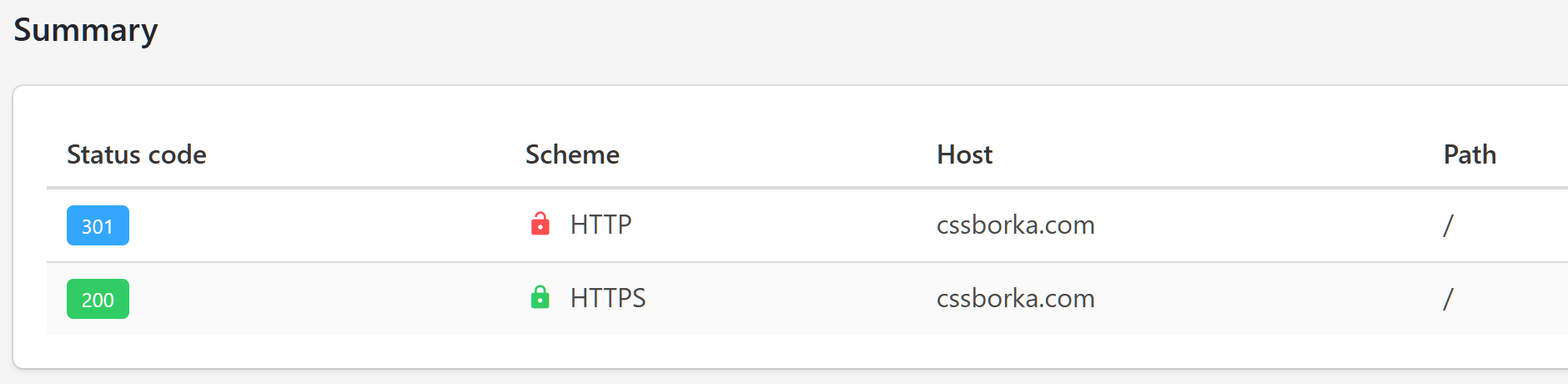
You can check the redirect with httpstatus.io or with the curl -I command in a terminal. The response must contain the 301 code and a Location header with the address on the new domain. Check not only the home page but also a few inner pages.
Yandex Webmaster
Add the new domain to Yandex Webmaster and verify ownership. Then specify the sitemap.xml address right away and copy the settings of the old website, such as the region.
For Yandex, the main signal of the move is the 301 redirect. The crawler will detect it, merge the old and new domains as mirrors and eventually show the new address in search results. You can track the merging progress in Webmaster for both websites.
Google Search Console
In Google Search Console you also need to add and verify the new domain, and then submit sitemap.xml. Google has a special Change of Address tool for moves: it is located in the settings of the old domain's property and works only if both domains are verified and the 301 redirect is already in place.
Detailed instructions are available in the Google documentation. Google recommends keeping redirects for as long as possible, but at least for a year.
What else to update
Besides the website itself, the old address may remain in many places: social media profiles, Telegram bot descriptions, Yandex Business and Google Maps listings, email signatures and business cards, ad campaigns and analytics tracking codes. If the website accepts payments or works with external APIs, check the notification (webhook) addresses and the allowed domains in those services' settings — otherwise payments and integrations may stop working.
After the move
Rankings may dip a little in the first weeks — that's normal: search engines need time to reindex the pages and transfer their ranking signals. A move usually takes from a few weeks to a couple of months. During this time, keep an eye on crawl errors in Webmaster and Search Console, and on 404 errors in the server logs: they will show the pages where the redirect didn't work.
Summary
Prepare the new domain with an SSL certificate, move the website and replace every mention of the old address, set up a page-by-page 301 redirect, add the new domain to Yandex Webmaster and Google Search Console, and keep the old domain for at least a year.
Above all, don't rush, and check every step: a redirect mistake is easy to make, and recovering rankings after it can take months.
🚚 If you need help with a move, my contact details are just below.
Published